GalaxyTranslate Phone Call Interpreter
GalaxyTranslate’s Phone Call Interpreter lets you have real-time translated phone conversations. Simply dial our dedicated number, and our system automatically translates speech between languages in real time — so everyone on the call hears the conversation in their preferred language.
For Callers (End Users)
Option 1: Registered Users (Fastest Experience)
If your phone number is registered with GalaxyTranslate, you get the fastest experience with no menus:
- Dial the GalaxyTranslate number provided by your administrator
- You will hear: “Welcome to GalaxyTranslate phone call interpreter”
- The system automatically recognizes your phone number and sets your preferred language
- If you have a default conference room, you are connected immediately
- If no default room is set, you will be asked to enter your conference room number followed by #
- Start speaking naturally — your speech is translated in real time for other participants
To register your phone number: Log in to your GalaxyTranslate account and add your phone number in your profile settings, or ask your administrator to add it for you.
Option 2: Unregistered Callers (Guest Access)
If your phone number is not registered, you will go through a quick setup menu:
- Dial the GalaxyTranslate number
- You will hear: “Welcome to GalaxyTranslate phone call interpreter”
- Select your language: Press 1 for English, 2 for Spanish, 3 for French Canadian, 4 for Russian
- You will hear a confirmation of your language selection
- Enter your conference room number followed by the # key
- You will hear: “Joining your conference room now”
- Start speaking naturally in your selected language
During the Call
- Speak naturally in your chosen language — no need to pause or use special commands
- You will hear all participants in the original language, plus a translated audio overlay in your preferred language
- There is a brief delay (1-3 seconds) for translation — this is normal
- Multiple participants can join the same room, each speaking their own language
- Press # to hang up and leave the conference
Live Transcription (Web Dashboard)
Registered users can view a real-time transcription of any conference call on this website:
- Log in to your GalaxyTranslate account
- Navigate to the Live Transcription page
- Enter your conference room number and click Join Room
- See a live feed of all speech and translations with speaker labels and timestamps
For Administrators
Setting Up Users
- Go to WordPress Admin > GalaxyTranslate > Registered Callers
- Click Edit next to any user
- Enter their phone number(s) with country code (e.g., 15551234567)
- Set their default language
- Optionally set a default conference room
- Click Save
Managing Subscribers
- Go to GalaxyTranslate > Subscribers to view all users and plan status
- Assign plans: Trial, Basic, Pro, or Enterprise
- Set monthly minute allocations and track usage
- Add new subscribers directly from the admin panel
Room Audio Settings
- Go to GalaxyTranslate > Dashboard
- Audio Mode: Original + Translation or Translation Only
- Monitor calls in real time from the admin dashboard
Viewing Call History
- Go to GalaxyTranslate > Call History
- View past transcriptions with timestamps, speakers, and translations
- Filter by room number
Supported Languages
| Language | Press | Code |
|---|---|---|
| English | 1 | EN |
| Spanish | 2 | ES |
| French Canadian | 3 | FR |
| Russian | 4 | RU |
Troubleshooting
| Issue | Solution |
|---|---|
| Call disconnects immediately | Ensure you are dialing the correct number and your account is active |
| No translation heard | At least two participants with different languages must be in the same room |
| Translation delay too long | Speak in shorter phrases for faster translation |
| Phone not recognized | Ensure your number is registered with country code |
| Cannot see live transcription | Log in to galaxytranslate.com and enter the correct room number |
Need Help?
- Email: [email protected]
- Phone: 914-217-0658
- Website: galaxytranslate.com
Joining an Ongoing Conference
Use this guide if a supervisor or teammate has asked you to listen in on a translated call that is already in progress. The whole process takes under 30 seconds.
Step 1 — Sign in to your account
Go to galaxytranslate.com/login and sign in with your operator credentials. You must be logged in to access the live transcription view.
Step 2 — Open the Live Transcription page
After signing in, open galaxytranslate.com/live-transcription. You will see a “Join a Conference Room” panel with a list of Active Rooms at the bottom.
Step 3 — Click the room number you want to join
In the Active Rooms list, click the button for the room you have been asked to monitor (for example Room 1 or Room 4200_u1_37418473). Clicking a room will automatically fill in the room number in the “Enter room number…” box for you.
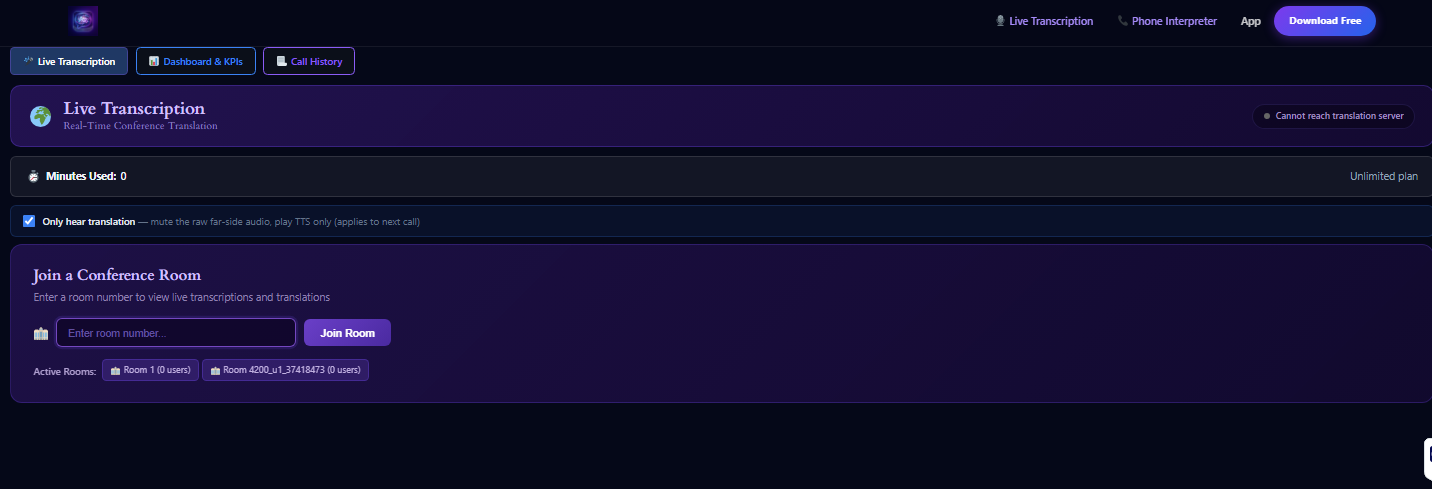
Step 4 — Click the Join Room button
Once the room number appears in the input box, click the purple Join Room button to the right of it. You will be connected to the live conference immediately and transcripts will start streaming into the feed as either party speaks.
Step 5 — Confirm your audio preference
At the top of the page there is an “Only hear translation” checkbox:
- Checked (recommended for monitoring) — you only hear the translated voice; the raw far-side audio is muted and TTS plays only. Note that this applies to the next call you join.
- Unchecked — you hear both the original speaker and the translated voice together. Useful if you need to verify translation quality.
Troubleshooting
| If you see… | Try this |
|---|---|
| “Cannot reach translation server” | Refresh the page. If it persists, check your internet connection. |
| No Active Rooms listed | There are no live calls right now. Wait for a call to start, then the room will appear automatically. |
| Clicked a room but nothing filled in | Refresh the page and try again. Make sure you are signed in. |
| “Sign In Required” message | Your session expired. Sign in again at galaxytranslate.com/login. |
| Anything else | Email [email protected] with the room number and a screenshot. |
Privacy note: Joining an ongoing conference means you can hear the live caller. Only join rooms you have been authorized to monitor. All joins are logged with your username and timestamp.